Why lock screen time tracking works when timers don’t
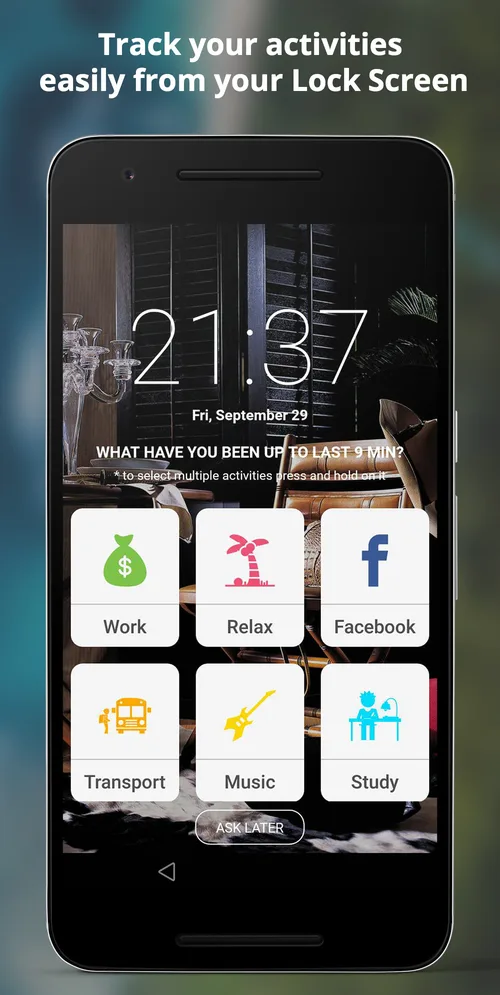
Most people give up on time tracking within a week because they forget to press start. Asking at the moment you unlock your phone fixes that.
Read articleBillable hours you forget to log are hours you are not paid for. A practical setup for tracking client work with SelfM and turning it into an invoice.
· 4 min read · SelfM team
For a freelancer, an unlogged hour is lost money. Yet many freelancers still rebuild their week from memory on Friday afternoon. Here is a simple setup that keeps an accurate record with almost no effort.
In SelfM, create an activity for each client or project you bill — “Client A”, “Client B”, “Website redesign”. Give each its own colour so they are easy to tell apart on the charts. Add a few non-billable activities too, such as Admin, Email and Learning, so you can see how much of your day is actually billable.
Switching between clients is exactly when timers get forgotten. With lock screen tracking, SelfM asks what you were doing when you next unlock your phone, so a quick switch from one client to another is still captured.
If you prefer, you can still start and stop a simple timer for long focused sessions.
Add a daily limit to activities like social media. It is a small nudge, but seeing the limit reached in your statistics is often enough to close the app.
Open Statistics, choose the date range and export your data as CSV. Open it in Excel or Google Sheets, filter by client, and you have the hours for your invoice — and a record to back it up if a client asks.
Once a month, compare billable hours with everything else. If admin and email take a third of your week, that is a sign to raise your rate, batch your admin, or automate something.
SelfM is free and works offline, so your client data stays on your phone. Get SelfM on Google Play.
Most people give up on time tracking within a week because they forget to press start. Asking at the moment you unlock your phone fixes that.
Read articleA time diary is the simplest productivity tool there is. Seven days of honest data will tell you more than any planning method.
Read articleFree on Google Play. No account and no internet needed — tap what you did and watch the picture of your day appear.