Simple time tracking for freelancers on Android
Billable hours you forget to log are hours you are not paid for. A practical setup for tracking client work with SelfM and turning it into an invoice.
Read articleMost people give up on time tracking within a week because they forget to press start. Asking at the moment you unlock your phone fixes that.
· 4 min read · SelfM team
Almost everyone who has tried a time tracker knows the pattern. Day one, every minute is logged. Day three, you notice the timer has been running “Work” through lunch. By day seven, the app is forgotten. The problem is not motivation — it is that a timer depends on you remembering to start and stop it.
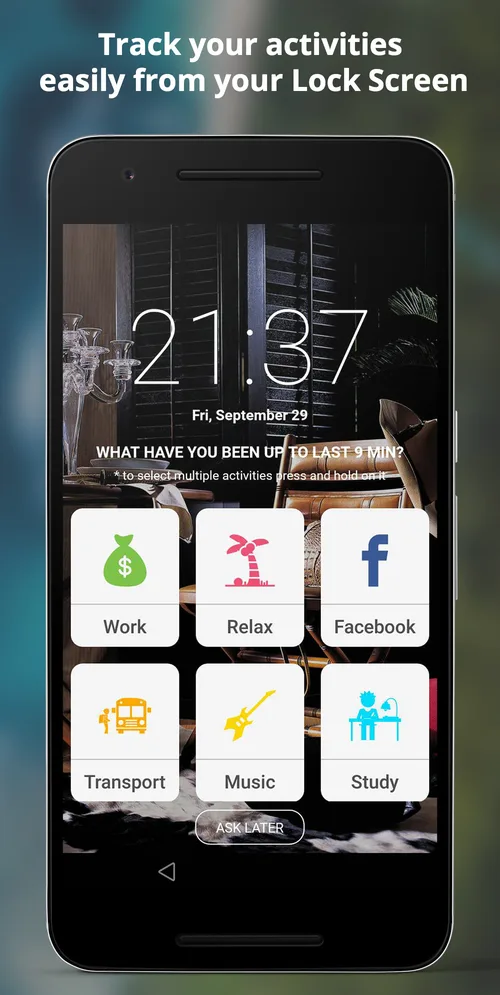
You unlock your phone dozens of times a day. SelfM uses that moment. When lock screen tracking is on, it shows your activity tiles with a simple question: “What have you been up to for the last 15 minutes?” One tap and the time is logged. There is no app to open and nothing to remember.
Because the question comes to you, the gaps that ruin timer-based logs mostly disappear. And if you are in the middle of something, “Ask later” moves the question to your next unlock.
It is hard to remember what you did three hours ago. It is easy to remember the last fifteen minutes. Short intervals make your log more accurate and make the answer quicker — you rarely need to think about it.
You can tune the interval in Settings. Fifteen minutes is a good starting point; if you want fewer prompts, try thirty.
You might be on a bus and listening to a podcast, or working while on a call. In SelfM you can press and hold to select more than one activity, so your log reflects what actually happened.
Tracking should not follow you everywhere. Set the days and hours when SelfM may ask — for example Monday to Friday, 9:00 to 19:00 — and it stays silent the rest of the time.
Most people are surprised by at least one number. That surprise is the start of changing how you spend your time. See all SelfM features.
Billable hours you forget to log are hours you are not paid for. A practical setup for tracking client work with SelfM and turning it into an invoice.
Read articleA time diary is the simplest productivity tool there is. Seven days of honest data will tell you more than any planning method.
Read articleFree on Google Play. No account and no internet needed — tap what you did and watch the picture of your day appear.