Why lock screen time tracking works when timers don’t
Most people give up on time tracking within a week because they forget to press start. Asking at the moment you unlock your phone fixes that.
Read articleFeeling busy is not the same as studying. Tracking study time per subject shows where your hours really go before exams.
· 4 min read · SelfM team
Many students feel they studied all day, then realise that a lot of that time went to messages, videos and “just checking” something. Tracking study time per subject gives you an honest answer — and helps you plan the weeks before exams.
In SelfM, add one activity for each subject or course — Maths, History, Programming — plus Lectures, Homework and Revision if you want more detail. Use colours you will recognise at a glance.
Give your most important subjects a daily goal, for example 60 minutes. SelfM shows your progress in Statistics, and streaks help you keep going on difficult days.
Add activities for your usual distractions — social media, games, video — and give them a daily limit. You will not be blocked, but you will see clearly when you went over.
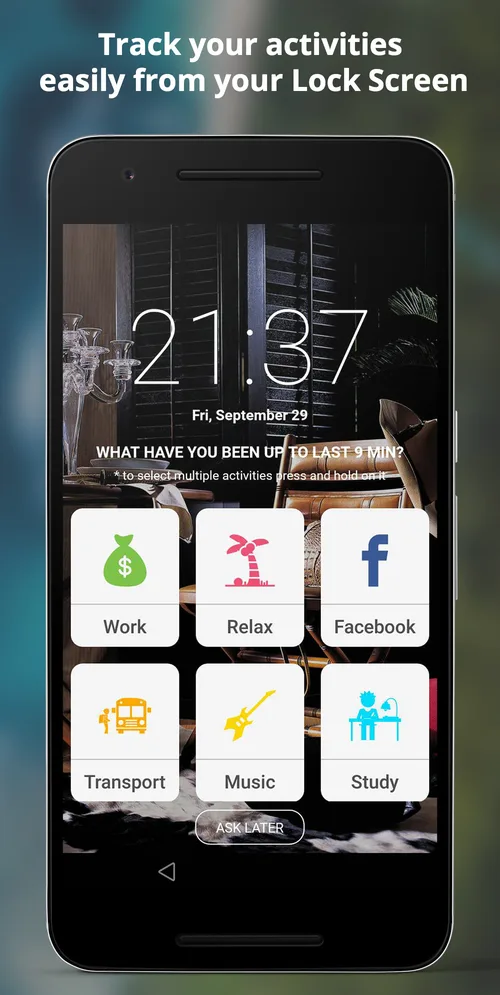
Turn on lock screen tracking for your study hours only, for example weekdays from 10:00 to 20:00. When you pick up your phone, SelfM asks what you have been doing since last time. It is a small moment of honesty that keeps study sessions on track.
SelfM is free, works offline and keeps your data on your phone. Explore all features.
Most people give up on time tracking within a week because they forget to press start. Asking at the moment you unlock your phone fixes that.
Read articleBillable hours you forget to log are hours you are not paid for. A practical setup for tracking client work with SelfM and turning it into an invoice.
Read articleFree on Google Play. No account and no internet needed — tap what you did and watch the picture of your day appear.